


MyIRVING
4.1261.00 Reviews
App Specs
- Version
- 6.0.0
- Updated On
- License
- Free
- Downloads
- 100,000+
- Developer
- Irving Oil
- Categories
- Auto & Vehicles
- Platform
- Android
Screenshots

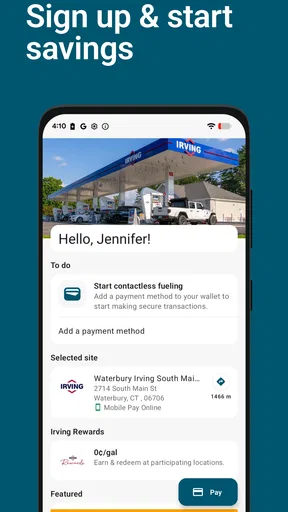
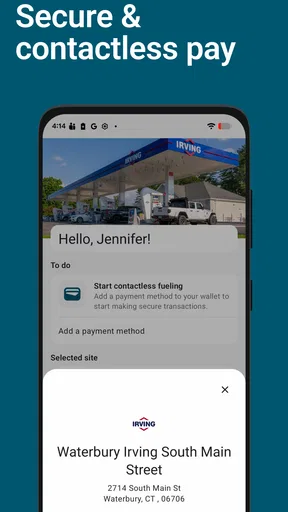
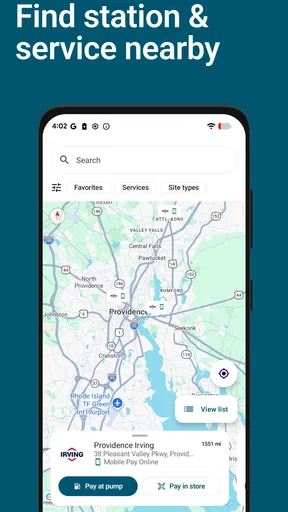
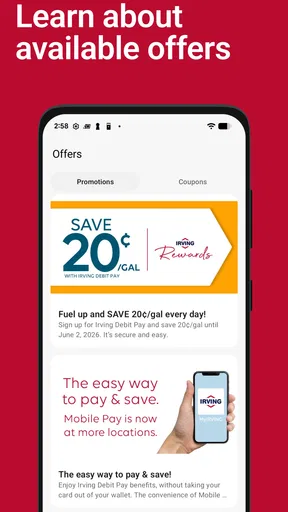
 Analysis by AppCompare
I judge a company app by whether it makes an ordinary errand easier without demanding that I reorganize my day around it. Irving Oil’s MyIRVING is a free Auto & Vehicles app, so its role is quite different from a general-purpose map or phone wallet: it is meant to support a more convenient relationship with Irving Oil. That focus can be useful if you already rely on the company, but it also makes the app’s value depend on whether its tools fit the way you actually travel and plan.
Who benefits from a company-specific app?
I would start by asking a practical question: do I expect to use Irving Oil’s services often enough to justify keeping a dedicated app on my phone? If the answer is yes, a single place for company-related tasks may be more convenient than repeatedly searching online or keeping separate notes. If you only encounter Irving Oil occasionally, the app may not earn a regular spot on your home screen; a browser search or a general navigation app may be enough for those rare occasions.
The distinction matters because a specialized app is not automatically a better choice than a general alternative. A map app is built to help compare routes and nearby destinations across providers, while a company app is useful when your priority is dealing with that one provider. I see MyIRVING as a potential companion to broader travel tools, not a replacement for them. Keeping both approaches in mind helps set realistic expectations before you install it.
Readability and navigation in everyday use
The clearest way to assess an app like this is to think through a task rather than browse screens without a purpose. Before leaving home, decide what you want to accomplish—checking something connected with Irving Oil, for example—and see whether you can identify the right starting point without wandering through unrelated menus. That small test tells you more about practical clarity than a polished first impression does.
For readability, I would pay attention to whether labels are understandable at a glance and whether important actions are easy to distinguish from informational text. This matters especially when I am checking details quickly between errands. If I need to slow down and interpret vague wording, the convenience advantage shrinks. I prefer an app that makes its main task obvious, while still allowing me to pause and verify details before I act.
One useful habit is to explore the app while parked and unhurried, then remember the path to the task I expect to use most. That avoids trying to learn a new layout in a hurry later. It is a modest preparation step, but it can make a focused, provider-specific app feel more useful without assuming that every feature or screen will suit every user.
Motor and sensory considerations
Phone-based tasks can be awkward for people who have limited dexterity, shaky hands, or difficulty making precise taps. I would test the controls at a comfortable pace and notice whether the actions I need are straightforward to select. If a task requires repeated small touches or careful timing, it may be easier to complete while seated and with the phone held securely than to attempt it while walking or standing in a busy area.
Worth Reading Before You Choose

EA SPORTS FC Mobile 26 Is a Bigger Football Game, but It Takes Time

Flipboard Shows What News Apps Must Do Beyond the Feed

Switching to Android Auto Means Rethinking Your Driving Routine

Google Calendar Makes a Crowded Week Easier to Manage

Ludo King Makes the Most of the Minutes Between Plans

Baby Panda World Brings Quick Play to Modern Phones, but Its Game Library Feels Busy
Visual comfort is just as personal. A screen that looks clear to one person may feel crowded or tiring to another, especially outdoors or in changing light. I recommend checking the app in the setting where you are most likely to use it, rather than assuming that a quick indoor glance settles the question. If reading on a phone is difficult for you, the operating system’s own display and accessibility settings may help, though the result depends on how the app responds to them.
Sound and attention also shape the experience. I would avoid relying on any phone task that needs close attention while driving; pull over safely first, or handle it before setting off. That is not a shortcoming unique to this app but an important boundary for any vehicle-related phone use. A helpful digital tool should fit around safe habits, not compete with the road.
Using it across different situations
Consider a routine day when I am planning a drive and expect to use an Irving Oil service along the way. I can check what I need before leaving, keep a broader map app available for route decisions, and use the company-specific app only for the part of the trip it is suited to support. This division of labor avoids expecting one app to answer every travel question and keeps the phone task brief.
For someone who travels a familiar route, the app may be most worthwhile as a repeat-use tool: learn the relevant path once, then return to it when needed. For an occasional visitor, the better workflow may be to open it only when there is a concrete Irving Oil-related task, rather than explore every section in advance. Either way, I would check the information before setting off. Mobile service, battery level, and the surrounding situation can all affect whether a phone is convenient at a particular moment.
It is also worth thinking about who else may use the same device. If a family member is helping someone with a task, agree in advance on what needs to be done and let the person using the phone take the time they need. Sharing a screen or handing over a phone can make a task easier, but it should not mean rushing through unfamiliar choices. The best workflow is the one that leaves the user in control.
Where the convenience has limits
A dedicated provider app naturally has a narrower purpose than a general travel or search tool. If I want to compare several companies, plan a route across many stops, or get a broad overview of nearby options, I would begin with a service designed for that wider job. A company-specific app can still be useful afterward, but its focus is a trade-off: fewer unrelated choices may make a familiar task simpler, while offering less breadth for comparison.
Another limit is that convenience depends on the app matching the task I have in mind. If I cannot quickly find the relevant section, or if I only need the service once, installing and learning another app may add friction rather than remove it. I would not keep it just because it exists; I would keep it if I return to it often enough to make its focused role worthwhile.
Privacy deserves a similarly practical approach. Before entering personal details or enabling optional settings, I would read the app’s on-screen explanations and decide what is necessary for the task. I would also secure my phone with the protections I normally use. That is sensible practice for any app connected to a company account or service, without assuming that a particular privacy feature is present.
What to check before relying on it
A few questions are best answered through a short, low-pressure test. First, can I reach the task I care about without searching around? Second, does the information I need appear in a form I can comfortably read? Third, can I complete the process without being rushed or distracted? Trying these steps at home or while parked gives me a realistic sense of fit before I depend on the app during a trip.
I would also decide what I want the app to replace. If the answer is “nothing in particular,” it may be unnecessary. If it replaces repeated searches or makes a familiar Irving Oil task easier to manage, that is a concrete benefit. And if my main need is comparing providers or navigating broadly, I would keep a general-purpose alternative in the mix rather than expect this app to cover everything.
As an app from Irving Oil, it is most relevant to people who already have a reason to interact with the company. Its free price lowers the barrier to trying it, but free does not mean it will be useful to every driver. The right measure is whether it saves effort on a task I actually do, while remaining clear and comfortable to use in the situations where I need it.
What is MyIRVING?
MyIRVING is basically your digital buddy for managing doctor appointments, prescriptions, and medical records all in one place. It's available on both Android and iOS, which is super handy, and it's designed to make healthcare management a breeze. No more scrambling through piles of papers or missing appointments because you forgot to jot it down in your calendar.
Simplifying Healthcare Management
Let’s dive into its features. First off, the appointment scheduler is probably my favorite part. You can book, reschedule, or cancel appointments with just a few taps. It's like having a personal assistant who never gets tired. Plus, you get reminders, so you never miss an important date with your doctor.
Another cool feature is the medication tracker. You can log your prescriptions and set reminders for when it's time to take your meds. This is a lifesaver for someone like me who can be a bit forgetful. Also, it keeps a history of your medications, so if you ever switch doctors, you have all the info ready to go.
Keep Your Records Handy
Now, let's talk about the medical records feature. You can upload your past medical records and access them anytime, anywhere. It’s a secure way to have all your medical history at your fingertips. It’s also easy to share with your healthcare provider if needed. The peace of mind knowing that all your crucial health information is organized and easily accessible is truly invaluable.
User Experience
So, how does it feel to use? The app has a pretty clean and intuitive interface. Navigating through different sections is smooth, and everything is laid out in a way that makes sense. Even if you're not a tech whiz, you’ll find it easy to use. It’s like the app developers knew exactly what we would need and made sure it was all just a tap away.
One thing I noticed is that the app loads quickly, and I haven't encountered any annoying bugs so far. It’s always a plus when an app runs smoothly without any hiccups. The developers did a good job keeping it efficient and user-friendly.
Security and Privacy
In today’s digital age, security is everything, especially when it comes to sensitive information like your health records. MyIRVING seems to have this covered with encryption and secure login features. You get peace of mind knowing your data is safe and private, which is crucial when dealing with healthcare apps.
Overall, if you're someone who likes to keep everything in check and appreciates having your healthcare management in one neat package, this app is worth checking out. It’s like having a personal health assistant in your pocket, and who wouldn't want that?
So, if you’re ready to take control of your healthcare journey in a more organized and efficient way, give MyIRVING a shot. It might just be the app you didn't know you needed. Happy health managing!
Pros
- User-friendly interface for easy navigation.
- Quick access to detailed account insights.
- Efficient payment management options.
- Secure login with biometric authentication.
- 24/7 customer support available via chat.
Cons
- Limited customization options for notifications.
- Occasional glitches with transaction updates.
- Requires stable internet for full functionality.
- Some features locked behind a paywall.
- Ads may interrupt free user experience.
FAQs for MyIRVING
What is MyIRVING and what does it offer?
MyIRVING is a comprehensive app designed to enhance your interaction with the city of Irving. It offers a range of features, including access to city services, local event updates, and real-time notifications for emergencies. The app aims to streamline the process of accessing city resources and staying informed about community happenings.
Is MyIRVING available for both Android and iOS devices?
Yes, MyIRVING is available for both Android and iOS platforms. You can easily download the app from the Google Play Store for Android devices and the Apple App Store for iOS devices. The app is designed to be user-friendly and accessible across various devices, ensuring optimal performance and convenience.
Does MyIRVING require an internet connection to function?
While MyIRVING does offer some offline features, such as viewing previously downloaded content, most of its functionalities require an active internet connection. Features like real-time notifications, event updates, and accessing the latest city services rely on being connected to the internet to provide the most current information.
Is there any cost associated with using MyIRVING?
MyIRVING is free to download and use. The app is designed to provide residents and visitors with essential city information and services without any charges. However, be aware that using the app may incur data charges depending on your mobile carrier's plan, especially when accessing features that require internet connectivity.
How does MyIRVING ensure user privacy and data security?
MyIRVING prioritizes user privacy and data security. The app employs robust encryption methods to protect your personal information and complies with relevant data protection regulations. Additionally, users have control over their data sharing preferences, ensuring that you can use the app with peace of mind regarding your privacy.


